Anubis#
Anubis是一个网站防护工具,其工作原理类似常见的Cloudflare验证,会在用户进入网站之前对客户端进行检查。客户端需要完成一定难度的Hash计算,服务器验证计算结果后放行,Hash计算代表了客户端可能需要执行几千几万次的计算,而服务器验证只需执行一次,对服务器开销小。 当有网络爬虫、CC攻击想进入源站时,需要在攻击者的客户端(比如无头浏览器中)进行一定量的Hash计算,攻击者一般会在一台物理机中运行多个配置了代理的无头浏览器,这些Hash计算会拖垮攻击者的服务器,从而迫使攻击者放弃或降低攻击频率。 现代设备通常都具有一定的算力,这些任务对于这些客户端来说,通常只需要几毫秒或几秒钟即可完成,用户只需要等待一段时间,不需要进行任何操作,成功后会自动进入实际后端服务。
工作原理#
Hash计算#
和经典的比特币挖矿一致,客户端需要使用一个确定的字符串加上任意数字,进行 sha256 计算,得到的 64 位hash值的前x个数为 0,x就是difficulty
const hash = await sha256(`${challenge}${nonce}`);整体流程#
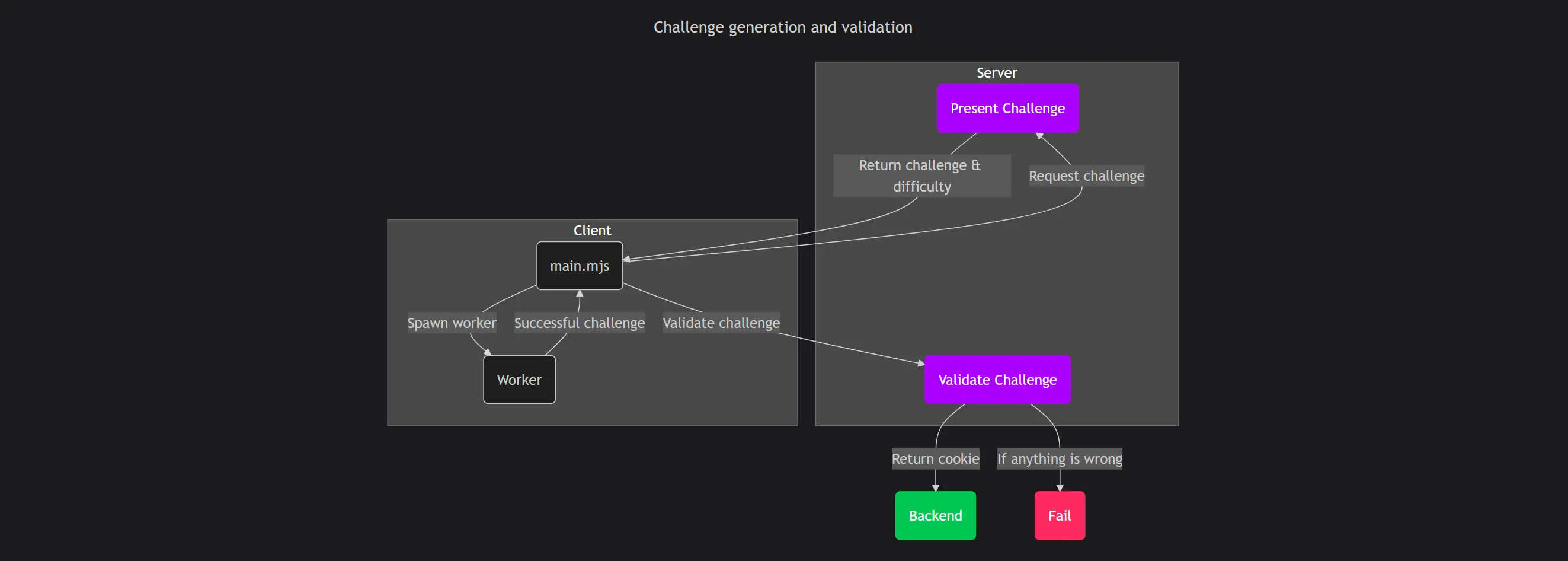
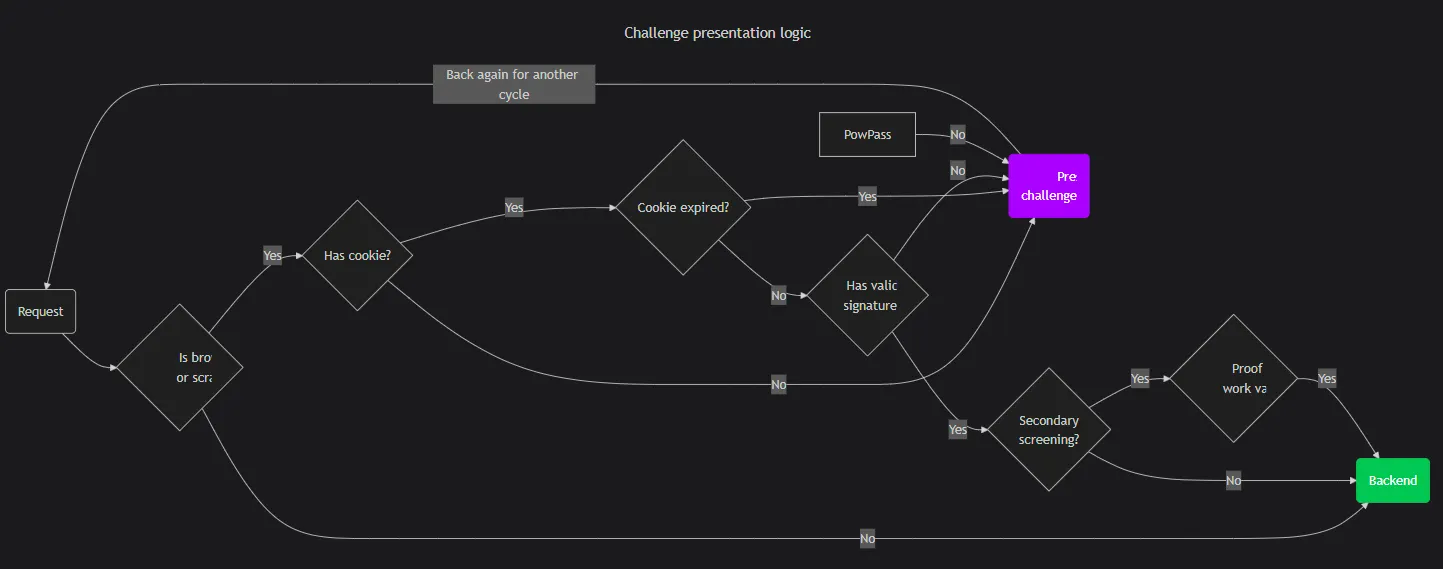 客户端第一次访问时,会根据访问者的IP、ASN、User-Agent,服务器的工作负载,计算出一个数值
 weight,之后通过 weight 匹配不同难度的Hash计算任务给客户端。客户端完成计算后,由服务器进行验证,成功之后放行到真正的后端服务,同时返回 Set-Cookies 以保存一段时间验证结果,当用户下次访问时,可复用上次的验证结果。
与NGINX搭配#
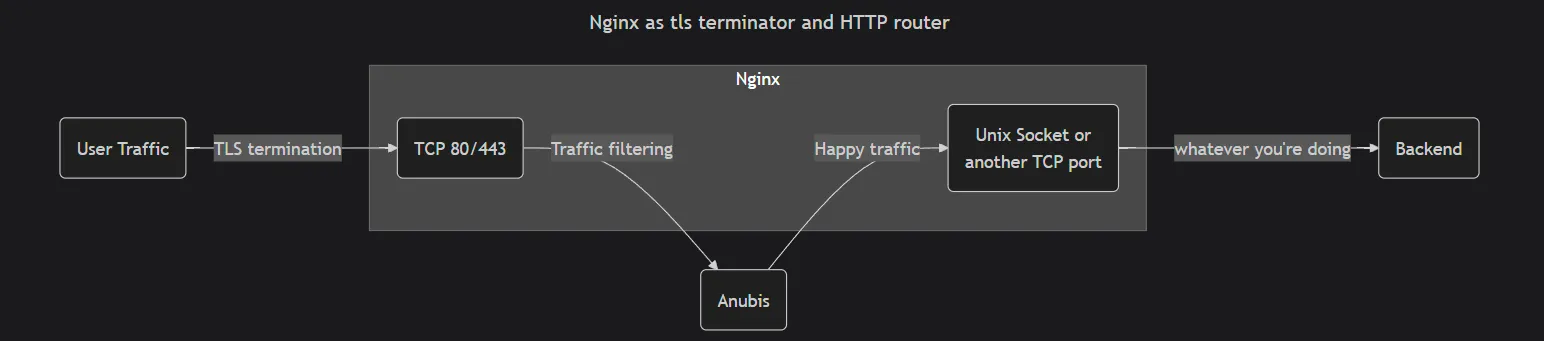
流量从 80/443 端口进入之后,先交给Anubis进行拦截,验证完成之后再交还回NGINX进行后续流程。在单个服务器内通过unix socket进行交互。
安装/配置#
此处以Debian 12 系统为例
安装Anubis#
下载并安装#
请在Github ↗获取最新的版本号
wget -O /tmp/anubis.deb https://github.com/TecharoHQ/anubis/releases/download/v1.21.3/anubis_1.21.3_amd64.deb && apt install /tmp/anubis.deb不能直连Github,可以使用加速域名,或者手动下载上传到服务器
wget -O /tmp/anubis.deb https://ghfast.top/https://github.com/TecharoHQ/anubis/releases/download/v1.21.3/anubis_1.21.3_amd64.deb && apt install /tmp/anubis.deb修改 /etc/anubis/default.env,内容如下
BIND=/run/anubis/instance.sock
BIND_NETWORK=unix
SOCKET_MODE=0666
TARGET=unix:///run/nginx/nginx.sock复制默认策略文件,暂不修改
cp /usr/share/doc/anubis/botPolicies.yaml /etc/anubis/botPolicies.yamlsystemd运行#
创建service文件
vi /etc/systemd/system/anubis.service[Unit]
Description=Anubis Bot Protection
After=network.target
[Service]
EnvironmentFile=/etc/anubis/default.env
ExecStart=/usr/bin/anubis \
-bind /run/anubis/instance.sock \
-bind-network unix \
-socket-mode 0666 \
-target unix:///run/nginx/nginx.sock \
-metrics-bind 127.0.0.1:9091 \
-metrics-bind-network tcp \
-policy-fname /etc/anubis/botPolicies.yaml
Restart=always
User=www-data
Group=www-data
[Install]
WantedBy=multi-user.target创建目录
mkdir -p /run/anubis /run/nginx修改权限
此处的用户和NGINX相同
chown www-data:www-data /run/anubis /run/nginx启用Anubis
systemctl enable --now anubis.service确保已经成功运行
systemctl status anubis配置NGINX#
此处提供一份可用NGINX,请自行修改扩展
user  root;
worker_processes auto;
pid /run/nginx.pid;

events {
    worker_connections 1024;
}

http {
    upstream anubis {
        server unix:/run/anubis/instance.sock;
    }

    server {
        listen 443 ssl http2;
        server_name uptime.vio.vin;

        ssl_certificate     /etc/ssl/violet/certs/all.vio.vin.cert.pem;
        ssl_certificate_key /etc/ssl/violet/certs/all.vio.vin.key.pem;

        location / {
            proxy_set_header Host $host;
            proxy_set_header X-Real-IP $remote_addr;
            proxy_pass http://anubis;
        }
    }

    server {
        listen unix:/run/nginx/nginx.sock;
        server_name uptime.vio.vin;

        location / {
            proxy_pass http://10.115.15.178:3001;
            proxy_set_header Host $host;
            proxy_set_header X-Real-IP $remote_addr;
        }
    }
}- upstream:定义上游服务器为anubis
- 第一个server:监听 443 入站连接,传输给anubis,传输客户端IP用于IP相关策略判断
- 第二个server:anubis验证通过之后,实际反向代理的位置
至此,基础配置已完成,默认情况下低风险客户端难度为 2,高风险为 4
Bot策略#
官网文档:https://anubis.techaro.lol/docs/admin/policies ↗
需要调整 botPolicies.yaml 文件
默认的botPolicies.yaml 配置文件:https://github.com/TecharoHQ/anubis/blob/main/data/botPolicies.yaml ↗
bots中定义了多个规则,可以看到已经通过import导入了一部分规则,这部分的文件可以在 /usr/share/doc/anubis/data/bots 中找到
默认的规则如下,可以仿照这些规则写自己的规则
可配置匹配规则#
匹配请求头#
/usr/share/doc/anubis/data/bots/cloudflare-workers.yaml
- name: cloudflare-workers
  headers_regex:
    CF-Worker: .*
  action: WEIGH
  weight:
adjust: 15匹配User-Agent#
/usr/share/doc/anubis/data/bots/headless-browsers.yaml
- name: lightpanda
  user_agent_regex: ^LightPanda/.*$
  action: DENY
- name: headless-chrome
  user_agent_regex: HeadlessChrome
  action: DENY
- name: headless-chromium
  user_agent_regex: HeadlessChromium
action: DENY指定表达式#
/usr/share/doc/anubis/data/bots/aggressive-brazilian-scrapers.yaml
- name: deny-aggressive-brazilian-scrapers
  action: WEIGH
  weight:
    adjust: 20
  expression:
    any:
      # Internet Explorer should be out of support
      - userAgent.contains("MSIE")
      # Trident is the Internet Explorer browser engine
      - userAgent.contains("Trident")
      # Opera is a fork of chrome now
      - userAgent.contains("Presto")
      # Windows CE is discontinued
      - userAgent.contains("Windows CE")
      # Windows 95 is discontinued
      - userAgent.contains("Windows 95")
      # Windows 98 is discontinued
      - userAgent.contains("Windows 98")
      # Windows 9.x is discontinued
      - userAgent.contains("Win 9x")
      # Amazon does not have an Alexa Toolbar.
      - userAgent.contains("Alexa Toolbar")
      # This is not released, even Windows 11 calls itself Windows 10
      - userAgent.contains("Windows NT 11.0")
      # iPods are not in common use
      - userAgent.contains("iPod")
匹配客户端IP#
/usr/share/doc/anubis/data/clients/mistral-mistralai-user.yaml
# Acts on behalf of user requests
# https://docs.mistral.ai/robots/
- name: mistral-mistralai-user
  user_agent_regex: MistralAI-User/.+; \+https\://docs\.mistral\.ai/robots
  action: ALLOW
  # https://mistral.ai/mistralai-user-ips.json
  remote_addresses: [
    "20.240.160.161/32",
    "20.240.160.1/32",
]匹配GEOIP#
- name: countries-with-aggressive-scrapers
  action: WEIGH
  geoip:
    countries:
      - BR
      - CN
  weight:
adjust: 10匹配ASN#
- name: aggressive-asns-without-functional-abuse-contact
  action: WEIGH
  asns:
    match:
      - 13335 # Cloudflare
      - 136907 # Huawei Cloud
      - 45102 # Alibaba Cloud
  weight:
adjust: 10匹配后动作#
| 动作 | 解释 |
|---|---|
| ALLOW | 允许,跳过后续所有检查 |
| DENY | 拒绝访问 |
| CHALLENGE | 进行客户端挑战 |
| WEIGH | 修改请求权重 |
ALLOW和DENY不再解释
CHALLENGE#
- name: generic-bot-catchall
  user_agent_regex: (?i:bot|crawler)
  action: CHALLENGE
  challenge:
    difficulty: 16 # impossible
    report_as: 4 # lie to the operator
algorithm: slow # intentionally waste CPU cycles and timename:名称,可自定义user_agent_regex:正则表达式匹配User-Agentaction:动作,立即进行客户端挑战challenge:客户端挑战配置difficulty:难度,16 表示计算出的hash值前 16 位为 0,不可能完成(比特币的前导 0 个数为 19-20),在客户端完成 16 位的计算可能需要几万年甚至更久(攻击者看着 99%的CPU陷入沉思)report_as:用户在界面上看到的难度数值(你甚至可以骗他,这个进度条怎么一直卡在 99%不走呢)algorithm:采用的Hash算法,slow故意折磨CPU
WEIGH#
调整请求的权重,正数为增加权重,负数为减少权重,后续会进入到 thresholds 中,针对不同的请求设置不同的CHALLENGE
0-10 的权重,进行快速算法,几乎不需要等待
- name: mild-suspicion
  expression:
    all:
      - weight > 0
      - weight < 10
  action: CHALLENGE
  challenge:
    algorithm: metarefresh
    difficulty: 2
report_as: 2其他#
根据服务器负载动态调整
示例在配置文件中已给出,有需要可以启用
  ## System load based checks.
  # If the system is under high load, add weight.
  - name: high-load-average
    action: WEIGH
    expression: load_1m >= 10.0 # make sure to end the load comparison in a .0
    weight:
      adjust: 20

  # If your backend service is running on the same operating system as Anubis,
  # you can uncomment this rule to make the challenge easier when the system is
  # under low load.
  #
  # If it is not, remove weight.
  - name: low-load-average
    action: WEIGH
    expression: load_15m <= 4.0 # make sure to end the load comparison in a .0
    weight:
adjust: -10测试页面#
为了方便在大家的浏览器中挖矿方便大家测试,我准备了这些界面
建议用隐私窗口打开,否则会使用上一次的结果